

K7 Insights
Free MSP Pricing Calculator (Excel, 2026)
Part of Grow Your MSP
Key takeaways
- Price minus the margin you keep is your budget to deliver. Tools plus people time have to fit inside it.
- Convert every vendor invoice to a per-user cost, and measure help desk hours per user out of your PSA. You can't price a service you aren't measuring.
- An hour of tech time costs a lot more than the paycheck. Add taxes and benefits, then divide by the share of paid hours spent on customers.
- Never price under the floor the math gives you. Start at or above it and raise $5 to $10 a user every few deals until people start saying no.
To calculate your MSP pricing per user, pick a price, pick the margin you want to keep, and treat what’s left as your budget to deliver. Then check that your tool costs and your help desk time actually fit inside that budget. If they fit, you can quote the price off the top of your head and know exactly what’s in it. If they don’t, you’ve found the problem before a customer did. This guide walks through the math with a made-up MSP, and the free MSP pricing calculator, an Excel sheet that also works in Google Sheets, does it for you. It’s part of how to grow your MSP on a price you can defend.
Why shouldn’t you just copy the $150 a user you saw online?
Because nobody posting that number has seen your invoice, and you’ve never seen their recipe. Somebody on Reddit or in a Facebook group says they charge $150 a user. Someone else one-ups them with $200. We grab one of those numbers because it makes the process easy. That’s the lemming move: follow your friend right off the cliff.
Think of a per-user price as a pot of chili. Everybody will tell you their number. Almost nobody tells you what’s in the pot. The MSP charging $200 might be in San Diego, like me, which is a different market from a small town. They might include on-site visits you don’t. Their team might deliver twice as efficiently as yours. Or yours might.
So before you copy anybody, ask a question that sounds dumb and that most of us skip: can the businesses you sell to afford it? You can be the best solution seller in town, and if the price doesn’t fit the market, your growth stalls.
The number also matters more than it feels like it does. McKinsey worked the math on public companies in 2003: for an average company, a 1% price increase with no loss of volume meant about 8% more operating profit (“The power of pricing,” McKinsey Quarterly). Your numbers will be different. The point stands: getting the price right is worth a few evenings of math.
How much do MSPs charge per user in 2026?
SMB-focused MSPs average somewhere between about $150 and $280 per user per month for their fullest managed services package, depending on how mature they are. Service Leadership’s 2026 profitability report breaks it down by operational maturity, its scale for how well an MSP is run:
| MSP maturity (Service Leadership) | Average fee per user per month, 2025 |
|---|---|
| Lower | $151.19 |
| Middle | $200.78 |
| Higher | $279.54 |
The better-run shops charge more, and the report says they’re more disciplined about selling on value, raising prices and selling the full package. Enterprise-focused MSPs charge roughly two to three times more per user than SMB-focused ones.
Then the same page adds the line that matters most: charging a higher fee per user won’t guarantee more profit if you don’t understand your true cost basis. That’s what the rest of this guide is for. A market range tells you where to look. Only your own math tells you whether a price works for your shop.
How do you calculate MSP pricing per user?
Work top-down in four steps: price and margin give you a budget, then tools and people time have to fit inside it.
- Price. Pick a price per user per month. It’s a decision, and you can change it.
- Margin. Pick the gross margin you want to keep. Gross margin is the share of the price left after the tools in the agreement and the people time to deliver it.
- Budget. Price times the share you spend is your budget to deliver. Everything else has to fit inside it.
- Check. Add up tools plus people time per user. If that cost fits inside the budget, the price passes.
Meet SpaceBalls, the made-up MSP I use in my episodes. It’s in a town like mine, and it’s pricing a 25-person office with one site. SpaceBalls picks $150 a user a month, the number it saw on social media, and wants to keep 50%. That’s on purpose: it’s a little under where the top 25% of MSPs by profitability land, and above the median. So SpaceBalls gets to spend $75 a user a month delivering the service.
That $75 is also a gift to your service manager. It’s a budget they have to deliver inside, and a KPI that protects your margin. Keep more, and you’ve got less to spend.
The margin pays for everything that runs your own company: the PSA, QuickBooks, the CRM, your salesperson, the rent and your own paycheck. Most of your automation tools land here too, whatever you’ve told yourself about them. Your customers aren’t paying for those. You are.
Why price per user instead of per device?
Because you can quote it in the first conversation. Ask a prospect how many computers they have, or how many servers and cloud hosts, and you’ll get the wrong number nine times out of ten. Ask how many employees they have and you’ll get the right one.
A mentor of mine taught me that time kills bananas and deals. If your quote depends on an assessment where someone counts every device and combs through the SaaS stack, you’ll be last to present. The more sales-focused MSP gets there first, gets to explain why they’re different and why the other guys aren’t, and now you’re climbing out of a hole they dug for you.
Per user does need some salt to taste. If a customer has a lot of part-time staff, expect the question, “Why do I pay a full user price for someone who works eight hours a week?” And some verticals don’t fit at all. At the MSP I ran, we had a vertical in senior living facilities, full of kiosks and tablets and part-time nurses. Those facilities didn’t talk about headcount. They talked about how many beds they had. So we started charging per bed.
It took some massaging to get right, and it became a differentiator. A prospect comparing us against an MSP that priced per user couldn’t do the mental math, and everything we said was about senior living. We were the most expensive option by about double. It worked anyway, because we spoke the customer’s language and the sales team could quote it fast without ever hearing the kiosk objection.
Build your pricing to answer objections you actually hear. Don’t build it around objections you’ve never heard. Get it to market and adjust only when people start saying no.
What should go in the per-user bundle, and what stays out?
Put in what the buyer is actually buying: not having to deal with IT. We like to say customers want cybersecurity, low risk and low downtime. What most of them mean is, “I don’t want to handle the nerd stuff, and I don’t want my employees spending time on it.” They want to work on their business. When technology helps, they want someone to call. When it breaks, they want someone to call.
So SpaceBalls keeps the menu short:
- Unlimited remote help desk
- On-site when remote can’t fix it
- Patching and monitoring on every computer
- A planning call once a quarter
Onboarding projects and Microsoft licenses get quoted separately, because they’re different for every customer. I’d urge you not to bundle Microsoft 365 into your managed services price. It makes you look more expensive than the MSP that left it out, and now your sales process depends on the prospect remembering that your number included licensing and theirs didn’t. Tell them you’ll right-size their Microsoft 365 in the first 60 days of onboarding and let them pick. They know they need it. Get the agreement signed first.
Here’s the trap I fell into. As technologists, we know what every tool can do, so we keep shoving more into the agreement. We want the best tool in every category. I did exactly that, and that nerd knowledge is what led me to build an MSSP inside the MSP I ran. Every addition made the offer harder to explain, until the salesperson couldn’t quote it without me. If you plan to hire a salesperson, build something someone else can sell. Your sales team has to understand the recipe well enough to sell it consistently, and your service team has to understand it well enough to deliver it consistently. If the stack changes every month, neither one can.
How do you turn vendor invoices into a per-user cost?
Convert every tool to the same unit. Most vendors don’t bill per user, so translate each line:
- Per endpoint: multiply by your endpoints per user. I use 1.5 as a working number.
- Per customer: divide by that customer’s users.
- Per site or per firewall: divide by the users at that site.
Why 1.5 when most people have one computer? The extra covers the server, the workstation in the closet and the network gear that occasionally throws a ticket. You can test your own ratio: pull the endpoint count from your RMM and the users you bill for in Microsoft 365, and divide.
Here’s SpaceBalls:
| Tool | Vendor charges | Converted | Per user |
|---|---|---|---|
| RMM | $2.00 per endpoint | x 1.5 endpoints | $3.00 |
| Antivirus + EDR | $4.00 per endpoint | x 1.5 endpoints | $6.00 |
| MDR (adds the SOC) | $3.50 per endpoint | x 1.5 endpoints | $5.25 |
| Empath Grow (customer training) | $1.36 per user | as is | $1.36 |
| vCIO / documentation tool | $50 per customer | / 25 users | $2.00 |
| Tools per user | $17.61 |
Full disclosure: Empath Grow is customer training from Empath, the MSP education software company I co-founded. Swap in whatever you actually use. Only the tools inside the customer’s agreement go in that column. The things worth bundling are the ones that keep a human from touching a ticket. When RMM was the new hotness around 2011, it was sold to us as the thing that would keep us from hiring another tier one tech. In some cases it did, because patched computers generate fewer tickets. The tools and the labor are connected, and that’s why you check them together.
One more tip from the shop I ran: pick vendors whose bill you can reconcile. I chose an MDR vendor partly because it integrated with our PSA’s billing, so nobody had to count licenses every month to know the agreement’s hard costs were covered.
How do you measure help desk hours per user?
Pull it out of your PSA. Take the last three months of time your team logged on managed customers, agreement work only, and leave out projects and onboarding, which get billed on their own. Divide by three to get one month. Then divide by your average monthly user count over those same three months. That’s your hours per user per month: tickets, patching, the quarterly planning call, all of it.
Every ticket needs time logged, or this number is a guess. That’s the problem for MSPs that don’t believe in time entry. They can’t price accurately, because they don’t know how much help desk time each unit they sell eats. If your time logs are a mess, this is the week to fix them. You can’t price a service you aren’t measuring.
If you don’t have history yet, start at one hour and replace it as soon as you have real logs. In my experience, the strongest shops run around 0.4 to 0.5 hours per user per month, and the ones in trouble run 1.4 to 1.5.
SpaceBalls measured 0.8 hours per user per month, averaged across its customers. That number lives inside the shop. The customer never hears it. They’re buying all-you-can-eat, and SpaceBalls manages the network so 0.8 holds, or beats it and keeps the extra margin.
Then run it customer by customer, because an average hides the ones eating you alive: the big one, the noisy one, the one that won’t replace the hardware you’ve told them to replace a hundred times.
What does an hour of tech time actually cost?
More than the paycheck. SpaceBalls pays its techs $30 an hour, which is in line with the market. Service Leadership’s 2026 compensation report puts the average US non-manager service desk tech, dispatch through Level 3, at about $65,000 a year in cash pay. That’s roughly $31 an hour before benefits.
Here’s how $30 becomes the number you price with:
| Step | Math | Result |
|---|---|---|
| Tech’s paycheck per hour | $30.00 | |
| Add taxes and benefits, about a quarter | $30 x 1.25 | $37.50 |
| Divide by the share of paid hours on customer work | $37.50 / 0.75 | $50.00 |
The quarter for taxes and benefits is my rule of thumb, and I like to shoot a little high. Your payroll person has your real number. The three quarters is because a tech is only on customer work for about three quarters of the hours you pay for. Time off, meetings and training live in the gap. To measure yours, divide the hours logged on customers by the hours you paid for.
Use that $50 as one blended rate for everybody who touches the customer. Once in a while a tier three tech works a ticket, or you do. I want the price to carry the higher number, so I’m not losing money every time the owner jumps in.
This is where owners price off the paycheck and then wonder where the margin went. If you divide by every hour in the year instead of the hours actually spent on customers, the gap comes out of your net profit, the money that pays you as the owner.
Does the price pass the check?
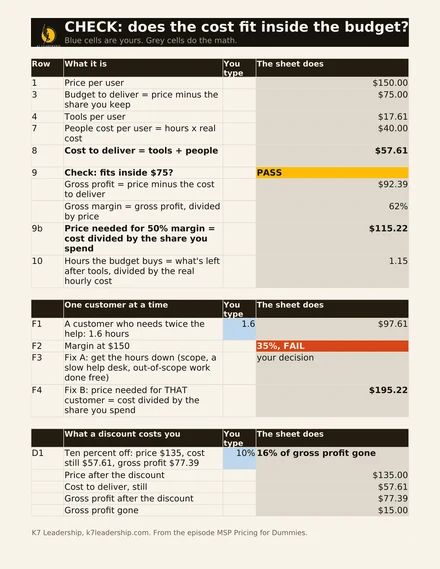
For SpaceBalls, yes. People time is 0.8 hours times $50, or $40 a user. Add $17.61 of tools and it costs $57.61 a user a month to deliver. The budget was $75.
| Line | Per user per month |
|---|---|
| Price | $150.00 |
| Budget at 50% margin | $75.00 |
| Tools | $17.61 |
| People (0.8 hours x $50) | $40.00 |
| Cost to deliver | $57.61 |
| Gross margin | 62% |
| Check | PASS |
| Floor price for 50% margin ($57.61 / 0.5) | $115.22 |
SpaceBalls keeps 62 cents of every dollar, and the plan only asked for 50. The floor, the price it would need to hit exactly half, is $115.22. It charges $150 by choice. Now it has a real offer: $150 a user, this stack, this much help desk, and it clears its own margin. That’s also why the sheet works as an MSP margin calculator: change the price and watch the margin move.
Another way to read it: take the tools out of the $75 and the budget buys a little over an hour of help desk at $50. SpaceBalls uses 0.8, so there’s room to breathe. If you wanted to go after bigger competitors in your market, you could even lower the price, as long as you stay above $115.
There will be months when one customer burns two hours a user and comes out upside down. That’s fine. This is a relationship. A bad month gets evened out by the other eleven, and that’s what the buffer is for.
If you run your own numbers and can’t tell whether the problem is your hours, your stack or your price, bring the sheet to a call and we’ll go through it together.
What do you do with a customer who fails the check?
Get the hours down first, and only reprice if the hours are real. Take a customer that eats twice the help, 1.6 hours a user. That’s $80 of people time plus $17.61 of tools, or $97.61 to deliver. At $150, you keep 35%, and you wanted 50. That customer fails. This is where a lot of current agreements get stuck, and it adds up. Service Leadership’s 2026 profitability report puts infrastructure managed services gross margin at about 46% for the median MSP and about 53% for the top 25% of MSPs by profitability, averaged over 2021 to 2025. A handful of customers like this one is often the difference.
The first fix is finding out why it’s 1.6. Is your team doing out-of-scope work for free? Is the help desk slow? Is a tool not doing its job, or was it never configured right? Check the scope first. All-you-can-eat still has a menu. Somebody said yes to something that was never on it, and now it’s an expectation. This is where account management earns its keep, and it’s another reason not to change your agreement every month. When the stack keeps moving, your team gets confused about what’s covered, and so does your salesperson.
You never lower your margin. You lower your cost.
The second fix, only if those hours are real, is to price that customer off its own cost. I had a customer that ran a stock brokerage. They traded all day, and a minute of downtime was expensive enough that they expected a lot from us. Their hours were real. So I went back to them and said, in effect: I either need to let you go or right-size your agreement. $97.61 to deliver at a 50% margin means about $200 a user.
And I said it out loud: here’s what we spend on you, and here’s what it takes to serve you well. Go interview any of your users. They love working with us. Here’s what it costs me. I wanted to keep them, and I didn’t want to cut the service they counted on. For that customer, $200 a user was the right price.
The calculator does this math for you. Change the hours on one customer from 0.8 to 1.6 and the price it needs moves from $115 to about $195.
What does a discount actually cost an MSP?
More than the discount. Say a competitor quotes the same 25-person office cheaper. Before you match them, make sure you’re comparing apples to apples.
Maybe they spend 0.4 hours a user because they never send anybody on site. That’s not in their agreement. At SpaceBalls’ $50 rate, that’s $20 of people time against SpaceBalls’ $40. The $20 gap is the on-site work: driving across San Diego, sitting in traffic, paying for that time. At a 50% margin, $20 of cost is $40 of price. Match their price with on-site still included, and the difference comes straight out of your margin.
Now say you just give the prospect 10% off, $135 instead of $150. Your tools didn’t get cheaper. Your techs didn’t get faster. All $15 comes out of what was left.
| Before | After 10% off | |
|---|---|---|
| Price | $150.00 | $135.00 |
| Cost to deliver | $57.61 | $57.61 |
| Gross profit | $92.39 | $77.39 |
Ten percent off the price is about sixteen percent off your gross profit. If you want to go after market share with a lower price, fine. Trim the stack to match and know exactly what you took out. For more on holding your number when a client pushes, read how to set and hold your managed services pricing.
Should an MSP sell good, better and best packages?
I do, and there’s buyer psychology behind it. In 1989, Itamar Simonson published research showing that an option becomes more attractive when it sits between two extremes (“Choice Based on Reasons,” Journal of Consumer Research). Researchers call it the compromise effect. So I build the middle package around the customer I actually want to serve, and the other two frame it.
The package we just built is Better: the menu, the tools, a planning call every quarter. That’s what SpaceBalls wants to sell.
- Good is Better minus the planning call, and maybe minus on-site, if a competitor in your market sells it that way and your salesperson needs an apples-to-apples answer.
- Better is the one you want them to buy.
- Best is Better plus more planning time, say one planning hour a month, or some of the heavier security tools. Best can be the one you don’t quote off the top of your head, because it may need tailoring for multiple sites or firewalls.
The way I’ve always thought about it, roughly nine out of ten buy the middle, a few buy the top and the rest buy the bottom. That’s my own rule of thumb, not a study.
If Best includes more planning time, put a row in the math for it: the extra planning hours times what that hour costs you, divided by the users. Leave that row empty and you drown your vCIO. They end up throwing a report at the client and running, because there’s no budget to hire a second one or pay one what they’re worth. My virtual CIO pricing guide goes deeper on that.
Heavy security work like pen testing and incident response I’d rather sell as its own agreement.
Three packages let a young sales team lean on the product instead of on the owner’s relationships. They let your service team know what usually gets sold, and they let your ops team set the PSA up so those packages are easy to manage. A mature sales team can get down to two packages, Better and Best. What I’d avoid is one expensive package. If you hand a brand-new rep the priciest offer in the market and someone else comes in at $110 a user when you’re at $250, the prospect asks what made you so expensive and whether that’s a go-away price. Expect nothing but no’s. You need people to want to buy.
Where should you set your price, and when should you raise it?
Start at the floor the calculator gives you, or above it, and never under it. Then, every three to five new customers, raise your price $5 to $10 a user. Eventually you’ll hit the ceiling where people say no more often. That’s where you stop, or step back down $5. Climb the ladder, find the ceiling, and make more money along the way.
Your market matters here too. Service Leadership’s 2026 profitability report finds that enterprise-focused MSPs charge roughly two to three times more per user than SMB-focused ones. Its compensation report shows tech pay outside the 40 largest US metros running about 7% below the national average. Lower wages usually mean a lower price, and that’s fine. Before you copy anybody’s numbers, ask who they sell to. A small town doesn’t have to carry San Diego’s price.
You might be thinking you’ll just sell to enterprise. Enterprise deals take longer, lean on bigger relationships and can take a year to land. In most local markets there are far more small businesses than enterprise ones, and the number of opportunities matters. Build for the majority.
That’s the ceiling for new deals. On the agreements you already have, raise your price every year. When your team asks for a raise, or earns the promotion you owe them for all that training, it shouldn’t come out of your margin. As your costs go up, your price goes up, and your margin never goes down.
This also gives you a clean answer on the first call. When a prospect asks what you charge, you can say, “On average we charge $150 a user, usually between $135 and $200 depending on what you need.” If they show you the door, they couldn’t afford your base package, and you found out in two minutes instead of two weeks. Once you’ve got a price people actually buy, the next job is a managed services sales process your rep can run without you.
What should you do tonight?
Run your own numbers before you quote anybody new. Pull your tool invoices, your tech pay and the last three months of tech time out of your PSA, and type them into the calculator. Then run a customer you sold six months ago through it. Was that price on point, or were you off?
Your price minus what you keep is your budget. Tools plus people is your cost. Make sure the cost fits, put it into three packages, and go find your ceiling. Build something someone else can sell, and don’t sacrifice the profit that pays you as the owner. Pricing is one piece of how you grow your MSP, and it’s the piece you can fix this week.
And when you’ve run it, tell me your price per user and what’s inside it. Stay accountable.
Get the MSP pricing calculator
The spreadsheet from the episode, with the SpaceBalls numbers already in it. Type in your price, your tool invoices, your tech pay and your help desk hours, and it tells you whether your price per user passes, the floor you should never price under, and what a discount really costs you.
Sent. The link's in your inbox. Grab it now if you'd rather not wait:
Excel file. Works in Google Sheets too. Blue cells are yours, grey cells do the math.
- How much does an MSP charge per user?
- Service Leadership's 2026 profitability report puts the average fee for an SMB-focused MSP's fullest managed services package at $151.19 per user per month for the least mature MSPs, $200.78 for the middle and $279.54 for the most mature. Enterprise-focused MSPs charge roughly two to three times more per user. Use the range to sanity-check your price, then build your own from your tool costs, help desk hours and target margin.
- How do I calculate what my MSP should charge per user?
- Charge whatever your own cost to deliver and target margin say, then test the market above that floor. In the episode's example, a 25-user office costs $57.61 a user a month to serve, so the floor at a 50% gross margin is about $115 and the MSP charges $150 by choice. Your floor will be different because your tools, your hours and your pay rates are different. A number you saw on Reddit tells you nothing about any of them.
- What gross margin should an MSP target on managed services?
- I target about 50% gross margin on the agreement, where gross margin is the share of the price left after the tools in the agreement and the people time to deliver it. That margin pays for everything that runs your own company: the PSA, accounting, rent, your salesperson and your own pay. Price lower than that and you won't have the money to hire the salesperson the product is built for.
- Should Microsoft 365 licensing be included in the per-user price?
- I keep it out and quote it separately. Bundling it makes your price look higher than an MSP that doesn't include it, so you end up comparing apples to oranges in the sales process and hoping the prospect remembers why. Promise to right-size their licensing during onboarding instead.
- How many help desk hours per user per month is normal for an MSP?
- Measure your own, because it varies a lot. In my experience, the strong shops land around 0.4 to 0.5 hours per user per month on agreement work, and the struggling ones run 1.4 to 1.5. If you have no history yet, use one hour as a starting assumption and replace it with real numbers from your PSA as soon as you have them.
Watch the conversation